The Cost of Running a Kitchen & Bath Dealership Without Connected ERP + CRM

The Cost of Running a Kitchen & Bath Dealership Without Connected ERP + CRM
Most kitchen and bath dealers do not have a software problem.
They have a connection problem.
The lead is in one system. The customer conversation is in somebody's inbox. The design is in 2020 or ProKitchen. Pricing lives in a spreadsheet. The purchase order is somewhere else. Installation updates arrive by text. The owner waits until the end of the month to find out whether the job actually made money.
Each tool may work on its own. The risk appears in the gaps between them.
That is where follow-ups get missed, information gets entered twice, outdated pricing reaches a quote, and small job changes quietly reduce gross margin.
An ERP and CRM built for kitchen and bath dealers closes those gaps by connecting the customer, the quote, the job, the order, the schedule, and the financial picture in one operating system.
How many gaps are hiding in your current workflow?
Book a free KABS live demo and walk through your process with a kitchen and bath industry specialist.
ERP and CRM: what is the difference?
CRM stands for Customer Relationship Management. It helps your team manage leads, conversations, follow-ups, proposals, and the sales pipeline—from the first inquiry through the final decision.
ERP stands for Enterprise Resource Planning. It connects the operational side of the business: quoting, purchasing, project stages, inventory, scheduling, installation, job costs, and reporting.
For a kitchen and bath dealership, the real value comes when the two work together.
A separate CRM can show… | A connected ERP + CRM can also show… |
|---|---|
Who the customer is | What was quoted and approved |
When your team last followed up | Whether materials were ordered |
Where the opportunity sits in the pipeline | Where the job sits from design to installation |
The expected sale value | The cost, margin, and profitability of the job |
A salesperson should not have to chase operations for a status update. An owner should not have to combine five reports to understand the business. A customer should not have to repeat information because one department cannot see what another department already knows.
Seven signs your current system is costing you more than you think
1. Leads depend on someone's memory
If follow-up happens only when a salesperson remembers, strong opportunities will eventually go cold. A connected CRM creates a visible next step, owner, and history for every lead.
2. The same job is entered more than once
Copying information from a design tool into a quote, then into purchasing, project management, and accounting creates work without creating value. It also creates multiple chances for an expensive error.
3. Your team debates which file is current
Kitchen and bath projects change. When revisions live across email attachments, folders, and text threads, the wrong version can move forward. One controlled job record gives the team a shared source of truth.
4. Pricing changes faster than your process
Vendor costs change. If price updates and margin rules are not connected to quoting, a job can look profitable when it is sold and disappoint when the costs arrive.
5. Project status requires a meeting
When managers must ask several people where a job stands, the system is not providing operational visibility. Status should be available before the meeting—not created during it.
6. Field updates arrive late
Installers and project teams are rarely sitting at a desk. If they cannot access the right information or update a job from the field, the rest of the business works with yesterday's picture.
7. Profit is clear only after the job is finished
By the time a final report exposes a margin problem, the opportunity to correct it has passed. Better systems make cost and margin visible while decisions can still be changed.
If three or more of these feel normal, your business may have outgrown the collection of tools holding it together.

The quiet cost of waiting
Disconnected work rarely creates one dramatic failure. It creates dozens of small leaks:
A qualified lead waits too long for a response.
A revised design is not reflected in the final quote.
A vendor increase is absorbed instead of passed through.
A purchase order is delayed because information is incomplete.
A manager spends another evening building a report by hand.
A customer senses confusion and loses confidence.
One missed follow-up may not change the year. One underpriced job may not threaten the business. But repeated across every salesperson, project, location, and month, those gaps become a growth ceiling.
Meanwhile, dealers with connected data can respond faster, see problems sooner, and scale without adding the same amount of administrative work. The longer disconnected processes remain in place, the more difficult they become to unwind.
That is the real urgency: the cost of waiting compounds quietly.
See the gaps before they become expensive.
Schedule your free KABS live demo to see how your workflow could connect from first lead to final installation.
What a connected kitchen and bath operating system should do
Generic business software can store contacts and tasks. A platform built around a kitchen and bath dealer's actual workflow should connect the work that happens after the lead enters the pipeline.
With KABS, dealers can bring together:
Lead and customer management: Track opportunities, conversations, proposals, and follow-ups in one sales pipeline.
2020 and ProKitchen design imports: Move design information into quoting and job workflows without rebuilding everything manually.
Smart quoting and margin control: Create more consistent quotes while making pricing and profitability easier to monitor.
Purchasing and vendor coordination: Keep orders connected to the project, its materials, and its stage.
Project and installation tracking: Follow the job from approval through ordering, delivery, scheduling, and installation.
Executive dashboards: View sales performance, project status, margins, and operational measures in real time.
QuickBooks Online integration: Keep important financial information connected instead of re-entering it across systems.
Cloud and mobile access: Give showroom, office, and field teams access to the information they need from wherever the work happens.
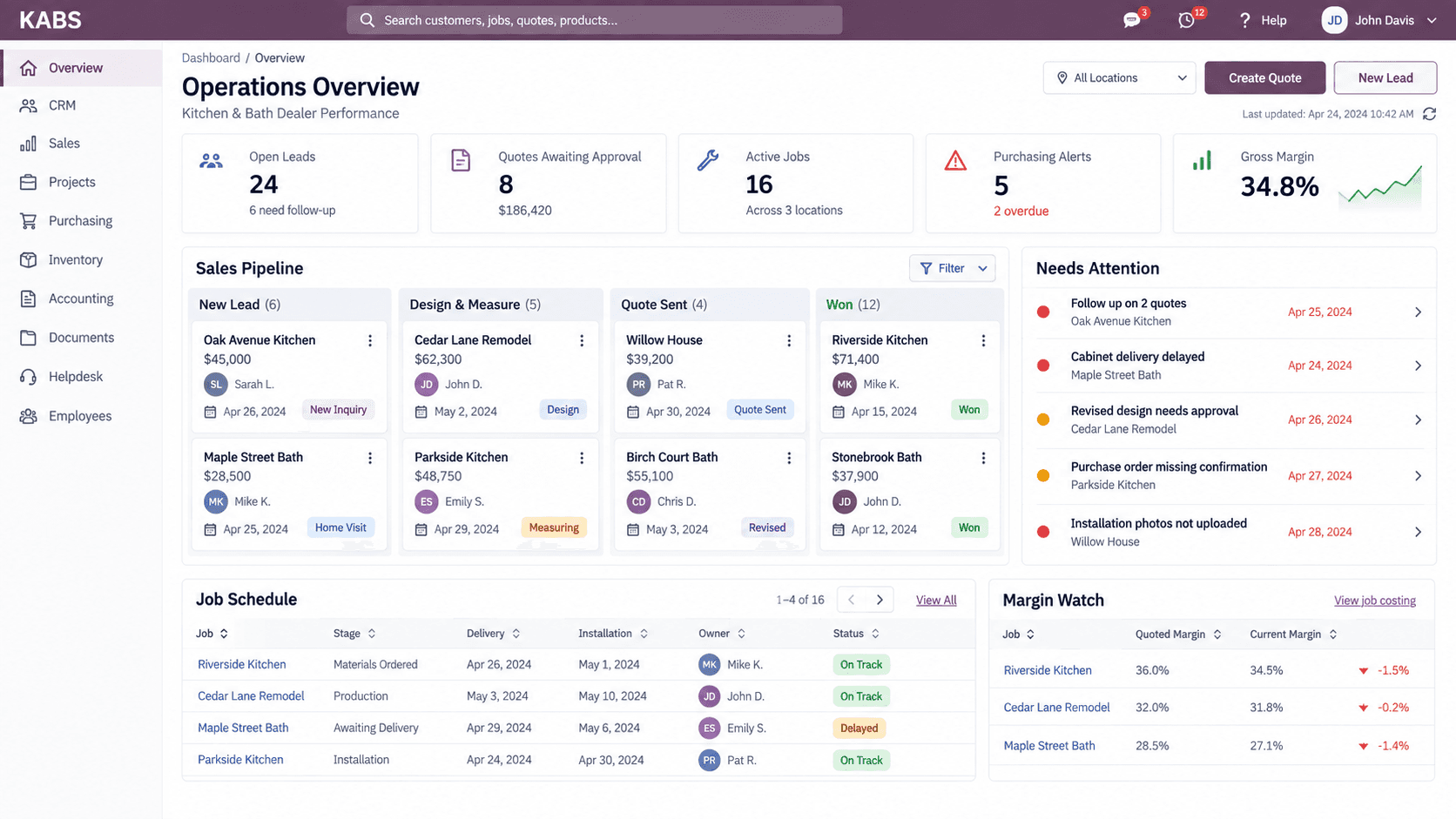
Explore the KABS platform and features.
What changes when everyone works from the same information?
The biggest benefit is not simply “having more features.” It is removing friction between people and stages of the job.
Before | With a connected workflow |
|---|---|
Leads live in inboxes and personal notes | Every opportunity has an owner, history, and next step |
Designs and quote details are re-entered | Design information moves into the sales and job workflow |
Teams ask which version is correct | One shared job record keeps current information visible |
Pricing errors appear after the sale | Margin rules and job costs are easier to monitor earlier |
Project updates depend on calls and texts | Teams can see job stage and status in the system |
Owners wait for manual reports | Dashboards provide faster operational visibility |
The result is not “more software.” It is fewer blind spots.
Why mobile access matters
A kitchen and bath business does not operate from one desk.
Salespeople meet clients in the showroom and in their homes. Project managers move between the office and job sites. Installers need schedules, documents, and job details in the field. Owners need visibility even when they are away from the showroom.
When the system is accessible from any device, updates can happen closer to the moment the work happens. That means fewer delayed notes, fewer status-chasing calls, and a more current picture for everyone.
Mobile access is not a convenience added to the workflow. For field-based teams, it is part of the workflow.
How to evaluate ERP and CRM software for your dealership
Before choosing a platform, ask these questions:
Was it designed around kitchen and bath workflows or adapted from a generic CRM?
Can it connect design, quoting, purchasing, project management, installation, and reporting?
Can our team see one customer and job history without switching between several tools?
Can it support both showroom and field users?
Can managers see sales, project status, costs, and margin without building reports manually?
Can it work with tools we already use, including 2020, ProKitchen, or QuickBooks Online?
Will the provider help configure the system and train our team?
Can the platform support additional users or locations as we grow?
Do not begin with a long feature checklist. Begin with the points where your business currently loses time, visibility, or margin. The right demo should show how those exact gaps are handled.
Frequently asked questions
Is ERP software only for large companies?
No. Small and mid-sized dealerships often feel disconnected processes most sharply because key people carry too much operational knowledge in their heads. A connected platform can create structure before growth makes the problem harder to solve.
Do we need separate ERP and CRM systems?
Not necessarily. Separate systems may add another integration and another place for data to fall out of sync. For many dealers, one connected platform provides clearer visibility from the first customer conversation through the operational and financial stages of the job.
Will our team have to stop using 2020, ProKitchen, or QuickBooks Online?
KABS is designed to connect important parts of the dealer workflow, including 2020 and ProKitchen design imports and QuickBooks Online integration. A live demo is the best place to confirm the exact fit for your current setup.
How do we know whether the investment is worth it?
Look at the cost of the gaps you already have: missed opportunities, hours spent on duplicate entry, avoidable quote errors, project delays, and margin loss that appears too late. Compare that with the value of faster follow-up, earlier visibility, and a repeatable workflow your team can actually follow.
What should we bring to a KABS demo?
Bring one real workflow and your biggest bottleneck. For example: how a design becomes a quote, how a sold job becomes a purchase order, or how you track margin from sale to installation. The conversation will be more useful when it is grounded in how your dealership operates today.
Your next step: find the gaps before they cost another job
You do not need to replace every process overnight. Start by seeing what a connected system would look like against your current workflow.
In a free live KABS demo, you can explore how leads, designs, quotes, purchasing, projects, installation, and margin visibility can work together in one platform built specifically for kitchen and bath dealers.
No generic software tour. Bring your real workflow and your real bottleneck.
Book Your Free KABS Live Demo →
Not ready for a product demo? Request a confidential margin and P&L assessment to identify where profit may be leaking from your current process.
KABS is a unified ERP and CRM platform built specifically for kitchen and bath dealers. It connects customer management, design imports, quoting, purchasing, projects, installation coordination, dashboards, and financial workflows so teams can operate with greater visibility and control.


